Products
Agency OS
Your whole agency. One operating system.
Deals, clients, projects, tasks, time, invoices and documents live in one connected system, and an AI layer sits on top of all of it, so the answer to "where does this client actually stand?" takes seconds instead of five tabs.
The problem
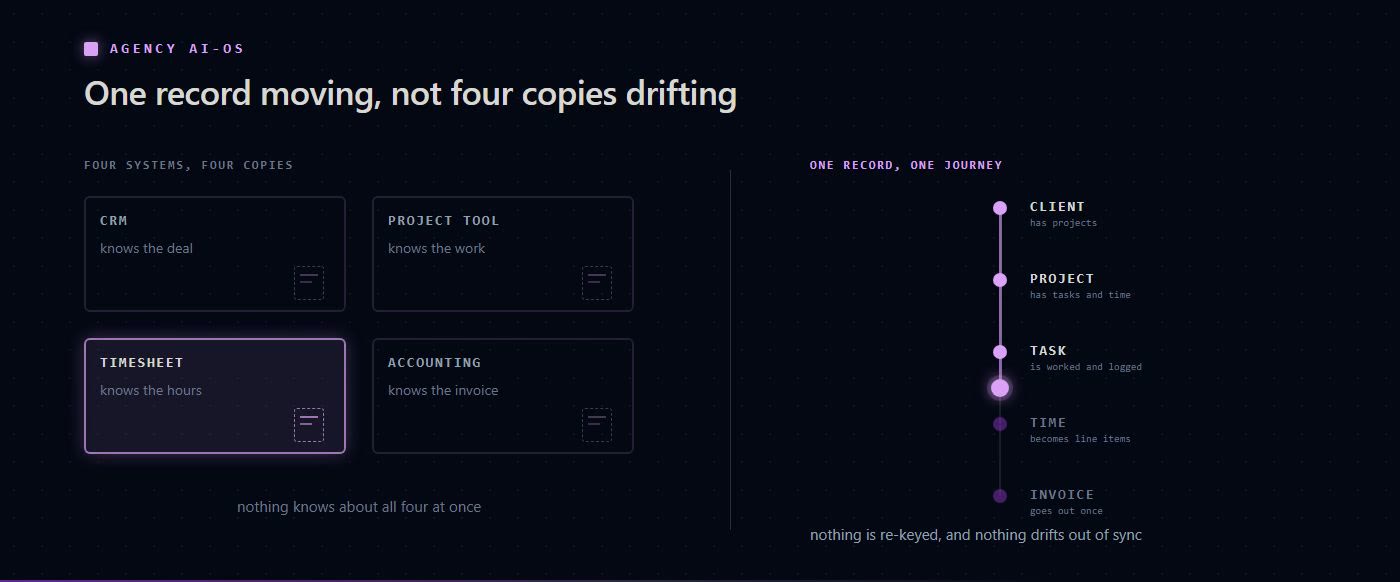
Most agencies run on a stack that doesn't talk to itself. The CRM knows about the deal, the project tool knows about the work, the timesheet knows about the hours, and the accounting package knows about the invoice, but nothing knows about all four at once.
So the knowledge lives in people's heads. Answering a simple question means searching across five systems and piecing it together manually. Reporting is a weekly act of archaeology. And the AI tools bolted onto each product can only ever see their own narrow slice.
Agency AI-OS is built the other way around: one connected data model first, with the intelligence layer reading across the whole of it.
What it does
Everything connects
A client has projects. A project has tasks and time entries. Time becomes invoice line items. Nothing is re-keyed and nothing drifts out of sync, because it is one record moving through the business rather than four copies of it.
The sidebar is organised the way the work actually flows (Customers for deals, clients, projects, tasks, time tracking, calendar and mail; Agency for invoices, receipts, documents, proposals, reports and notifications).
An AI assistant that knows your business
Ask a question in plain language and get an answer built from your own data, not from general web knowledge. The assistant converts your question into a vector search, runs it across both team memory and your embedded documents at once, merges the strongest results, and writes a grounded answer with source references you can click through.
It is strongest at the cross-cutting questions no single tool can answer: what is outstanding across every active client, which deals have stalled in proposal, where the signed contract for a given account actually lives.
Scheduled AI, not just chat
The Command Centre runs AI jobs on a clock (nightly summaries, weekly pipeline reviews, recurring data checks). Write the prompt once, set a schedule or a cron expression, choose the model to match the task, and set retries, timeouts and notification rules.
Every run is logged. A Kanban board shows queued, running, succeeded and failed jobs, and any run opens to reveal the full output the model produced.
A visible knowledge layer
BRAIN makes the usually-invisible AI plumbing inspectable. A force-directed graph shows the entities extracted from your documents and how they relate. An entity inspector traces where any concept, person or organisation appears. A live activity stream confirms new uploads have actually been indexed, and memory sectors show embedding freshness folder by folder.
This matters in practice: when an AI answer looks stale, you can see exactly why rather than guessing.
Personal AI agents
Every user gets a Hermes agent with its own console (live status, the full inventory of skills and integrations it can call, a chat panel whose credentials never touch the browser, and recent run history).
An intelligence row tracks token usage and spend broken down by model, surfaces recommendations about underused skills or high error rates, and shows what the agent has committed to long-term memory in the knowledge graph.
Built to be handed over
Role-based access controls what each person sees. A full handbook documents every feature, and a ? button on any screen opens task-focused help for that exact page with a link into the matching chapter. Admins get monitoring, system settings and a control plane.
Who it's for
Agencies and professional services firms that bill for time and expertise, run multiple client engagements at once, and have outgrown a patchwork of point tools, particularly those that want AI reading across the whole business rather than one feature at a time.
Still to confirm
Not yet confirmed
The research behind this page lists these as unverified, so they are not stated anywhere on it: pricing and packaging, deployment model (SaaS vs self-hosted), which LLM providers are available to customers, data residency and security posture, integration list, and any customer proof points.
See it running on your own agency's shape of work.


 Onnex
Onnex